
Windows Phone Device Manager als Beta Version veröffentlicht
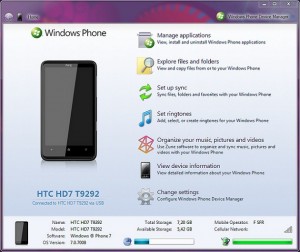 Nun ist es endlich so weit, der lange angekündigte Windows Phone Device Manager von TouchXperience ist nun als Beta Version zu haben. Das Tool bietet einen einfachen Zugriff auf das Windows Phone 7 Smartphone und viele Funktionen. Einige Highlights wären:
- Eigene Klingeltöne;
- Einbindung in den Windows Explorer;
- SMS lassen sich direkt vom PC versenden;
- Synchronisation;
- Smartphone als PC-Fernbedienung nutzen;
- …
Erforderlich
- Registred/unlocked Windows Phone 7 Smartphone
- Windows Vista or Windows 7 32/64-bit
- .NET Framework 4.0
- Windows Phone Developer Tools
Download der Beta-Version
(Zur Installation ist das .NET Framework 4 erforderlich, dieses muss zuvor installiert werden)
 Arno Burkheiser bei
  Andreas bei
 Stf bei
  marc bei



ist dafür chevron erforderlich?
wenn ich es starten will kommt fehlermeldung mit folgenden details:
Problemsignatur:
Problemereignisname: CLR20r3
Problemsignatur 01: wpdevicemanager.exe
Problemsignatur 02: 1.3.0.0
Problemsignatur 03: 6
Problemsignatur 04: WPDeviceManager
Problemsignatur 05: 1.3.0.0
Problemsignatur 06: 6
Problemsignatur 07: 5f3
Problemsignatur 08: e8
Problemsignatur 09: System.IO.FileNotFoundException
Betriebsystemversion: 6.1.7600.2.0.0.256.1
Gebietsschema-ID: 1031
Zusatzinformation 1: 0b75
Zusatzinformation 2: 0b75568a0e6063f8cf7482f4e14934ab
Zusatzinformation 3: 9834
Zusatzinformation 4: 98346bb3eb4168d1fedd16afdae71a50
Kann mir jmd helfen?!?
Ich bin aktuell leider nicht daheim, deshalb kann ich es nicht selbst testen.
- You can initiate connection from both PC and device (tap PC Synchronization in TouchXperience to etablish connection from device). You can connect via USB or Wi-Fi, but the first time you have to connect via USB so WP Device Manager can deploy TouchXperience and your device can get your
- In the current version you can't manually set the PC or phone IP address
- Make sure port 8007 is not blocked by firewall on PC and port 8107 is
- When WP Device Manager initiate a connection and can't connect to the
- Some tasks requires your phone screen to be unlocked
- It is not necessary to have Zune runing in order to use WP Device
- If WP Device Manager does not start at all, make sure you installed all
- If you are not able to connect or if some features are not properly
- If you get a message "TouchXperience version 1.2.3.0 or later is
- If you have connection problems, try the following may help: unplug/replug
- WP Device Manager or some components of it may be considered as
- WP Device Manger is automatically disconnected when you quit
- Tap on a menu title in TouchXperience and the main menu will show up
- If you want to take screenshots of an other application on the phone you
- You can only access \Windows and \My Documents on non-HTC devices and
- Applications installed with other tools than WP Device Manager are not
- Some application versions are incorrect. This is due to the fact that
- You can't copy most of DLL and EXE in \Windows directory, this is simply
- You can check TouchXperience version in Settings or in WP Device Manager
- You can send toast notifications from any program on your PC using
- In order to use WP Device Manager from Windows Device Stage, you must
PC IP address.
to connect, or change default ports.
reachable on device.
phone, in case you are connected via USB it will launch TouchXperience, in
other cases it will send a push notification to your phone asking you to
manually launch TouchXperience
Manager.
the requirements and try to reinstall full .NET Framework 4.0 and developer
tools.
working, go to Settings in WP Device Manager, click Restore default settings
and eventually restart your PC.
required" it means Device Manager is not able to communicate with
TouchXperience, to solve the problem, go to Settings in WP Device Manager,
click Restore default settings and restart your PC. Try to temporarly
disable your anti-virus or firewall programs to see if that's the problem.
your phone, close or start Zune, restart WP Device Manager, make sure your
device is detected by Zune, in worst case restart your PC.
potential threat by anti-virus or firewall programs, this is a false alarm,
you may need to add exceptions to your anti-virus or firewall may prevent WP Device Manager from working correctly.
TouchXperience (for example when you launch an app or return to Start screen).
This is not a bug, this is because TouchXperience is stopped due to the lack
of native multitasking in WP7. To workaround you can enable multitasking in
TouchXperience settings.
need to enable multitasking in TouchXperience settings
some folders may appears empty. This is because only HTC devices have full
file system access at the moment.
recognized (they are identified by their id) on non-HTC device, for the same
reasons than above. To solve the problem you can simply browse your original
xap files, application info will be automatically cached and diplayed in the
app manager.
some developers does not update their application manifest with correct
version number when they release new versions. To fix the problem you can
check for app updates and click on Dismiss All assuming all your applicatons
have been updated to their latest version.
because these are not files but modules.
application list.
command line C:\Windows\WPDeviceManager\WPDeviceManager.exe /SendToast "message".
have Windows 7 and driver signature verification disabled, unfortunately
this is because Windows 7 recognize only digitally signed drivers.
@pemko „ist dafür chevron erforderlich?“
Ich weiss es nicht genau, zumindest scheint es auf den ersten Blick so.
Ich bekomme keinen Zugriff aufs Tel. Wird als verbunden angezeigt und mehr passiert dann nicht. Ist ein Mozart ohne Branding aber mit „NoDo“.
Was ist den unter „Registred or unlocked Windows Phone 7 device“ zu verstehen?
Unlocked verstehe ich mal als Jailbreak (chevron) aber „Registred“?!
Ist das Offiziell von Microsoft oder ist das sowas wie ein „Hack“….?
“Registred or unlocked Windows Phone 7 device”
Das ist ein als Developer-Phone registriertes Phone. Man braucht ja auch die „Windows Phone Developer Tools“. Freischalten kann man das Phone, wenn man sich beim App Hub (http://create.msdn.com/en-US/) registriert. Als Student ist das kostenlos und man darf ein Gerät freischalten, als normaler Entwickler kostet es 99,00 $ pro Jahr und man kann 3 Geräte freischalten.
Oder … das Phone hat einen Jailbreak 😉
das programm zeigt beim ausführen virengefahr an…
Kann mir einer den Wallpaper Link zu dem in dem Video geben?
Ich kriege überhaupt keinen zugriff auf dieses Programm.
Weiß nicht was ich da falsch gemacht habe 🙁
Dito, ich kann es installieren, es ist als Verknüpfung auf dem Desktop, aber ich kann es nicht starten…hmm
Habe das gleiche Problem. Installation kein Problem aber das Programm selbst will nicht starten, kommt eine Fehlermeldung. Liegt wohl noch an der Beta?
Hallo,
kann es auch nicht starten 🙁
Naja, wenn einige sagen, dass das Programm als Virus angezeigt wird, sollte man da besser die Finger von lassen.
Zum Starten: Virenschutz vorübergehend deaktivieren (bei AntiVir rechtsklick auf das Logo in der Symbolleiste unten rechts und dann bei „AntiVir Guard aktivieren“ das Häkchen entfernen). Nach dem Ausführen sollte man den Virenschutz wieder aktivieren.
AUF EIGENE GEFAHR!
@all, bei denen es nicht startet: Ihr müsst es als Administrator ausführen.
@all, die keinen Zugriff auf das Phone bekommen: 1. man muss Ports in der Firewall freigeben (8007,8107); 2. es muss TouchXperience auf dem Phone installiert sein: wenn der Manager es nicht beim 1. Mal gemacht hat, einfach auf Settings -> Resotre defaults gehen.
@all: es ist Chevron (vor dem Update auf NoDo) oder ein aktiviertes Entwickler-Gerät nötig.
@all: sollte irgendetwas nicht funktionieren: Settings -> Restore Defaults und startet den PC neu.
@SkyNet: Das ist ein Standardhintergrundbild von Windows 7.
@Elerador,
wenn ich jetzt, um dieses Tool zu nutzen, mein Handy mit Chevron entsperre, kann ich das dann jederzeit nochmal Rückgängig machen, denn mit so nem Jailbreak verfällt die Garantie soweit ich weiß und die würde ich ja ganz gerne behalten??
ihr müsst euch die developer tools downloaden un installieren un euch bei app hub kostenpflichtig anmelden also euer telefon freischalten … ich denke aber mal das is nur bei der beta dann so … also das diese hauptsächlich für entwickler is …
Hallo
Ihr müsst auf jeden Fall Windows Phone Developer Tools installieren, dann kann das Programm auch gestartet werden!
Also TouchXperience konnte ich problemlos installieren (per xap) allerdings lässt sich bei immer noch nicht der Device Manager starten (trotz Neuinstallation der Dev-Tools, Net framework 4, und abgeschaltetem Avira) !??????
System ist Win 7 64bit
Jemand noch ne Idee ?
@Julian:
Man kann dir nicht nachweisen, dass du den „Jailbreak“ verwendet hast. Dieser „Jailbreak“ stellt nämlich eig. nur den Eintrag in der regedit von WP7 um, der dein Phone als Entwickler-Phone kennzeichnet. Er baut also kein inoffizielle Funktion ein (welches Cydia auf iOS tut). Solltest du dein Phone einschicken, dann können die nur sagen, dass du ein Dev-Phone hast – nicht aber, dass du einen „Jailbreak“ hast.
Ganz anders wäre es, wenn du dein Gerät unbranden würdest – dann könnten sie was sagen.
@Elerador:
danke für die Auskunft war mir da halt nicht so sicher. 😉
Ganz ehrlich, bei den Sachen, die man alles machen muss (freischalten als Entwicklerphone etc) las ich lieber die Finger davon. Habe keine Lust, mir mein Phone am Ende wegen solchen Sache zu zerschießen… siehe einige Leute, weche in Zukunft vom Update ausgenommen sind, weil sie keine 2-3 Wochen warten konnten und das Telefon hacken mussten um ja möglichst schnell das Update zu haben… Zune ist zwar scheisse und läuft bei mir mittlerweile auch nur, wenn ich ein anderes Benutzerkonto nehme, aber siehe oben.
Ich krieg den Device Manager immer noch nicht gestartet, trotz Neuinstallation der DevTools und Netframe4 und allem drum und dran 🙁
Kann vielleicht jemand mit der von Windows erzeugten Problembeschreibung was anfangen ????
6.1
7601 Service Pack 1
(0x1): Windows 7 Ultimate
Ultimate
7601.17514.amd64fre.win7sp1_rtm.101119-1850
1130
Multiprocessor Free
X64
1031
1904
C:\Windows\WPDeviceManager\WPDeviceManager.exe
C:\Windows\WPDeviceManager\WPDeviceManager.exe
CLR20r3
wpdevicemanager.exe
1.3.0.0
6
System
4.0.0.0
4ba1dff4
2e3b
9c
System.InvalidOperationException
6.1.7601.2.1.0.256.1
1031
0b75
0b75568a0e6063f8cf7482f4e14934ab
9834
98346bb3eb4168d1fedd16afdae71a50
D1E78F39-B3DA-416E-B3AF-40510344B774
Gigabyte Technology Co., Ltd.
H67M-UD2H
F1
Sorry, zu wenig Platz für die ganze Meldung 🙁
Largooo hat recht hatte selbst die Mango beta drauf und nur durch glück wieder runterbekommen. Ich weiss nicht, ob man sich hier auch das Handy schrotten kann, aber ich würds nicht drauf ankommen lassen.
Bei mir startet das programm erst garnicht =((
liegt es an meine 64bit version von windows 7 premium ??
Das Programm ist für Windows XP Service Pack II geschrieben, funktioniert offensichtlich nicht auf Windows 7.
Gruss, O.G.